实战教程
本文档将给出一些详尽的示例教程。
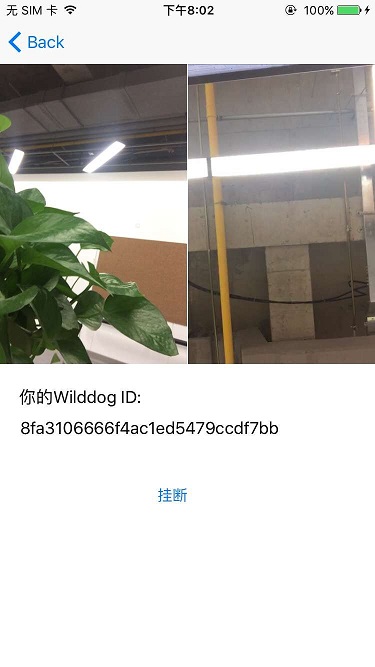
本教程以一对一视频通话为例,讲解如何通过 Video SDK 实现实时视频通话功能。
在此之前需要开启控制面板中的“实时视频通话”功能。
示例的最终的展示效果如下图:
1. 安装 SDK
Section titled “1. 安装 SDK”要将 Wilddog SDK 导入到你的工程中,推荐使用 CocoaPods,如果没用过 CocoaPods,请先访问 CocoaPods getting started。
打开工程目录,新建一个 Podfile 文件
$ cd your-project-directory$ pod init$ open -a Xcode Podfile # opens your Podfile in XCode然后在 Podfile 文件中添加以下语句
pod 'WilddogVideo'最后安装 SDK
$ pod install$ open your-project.xcworkspace2. 用户身份认证
Section titled “2. 用户身份认证”视频通话的前提条件是要有可识别的用户身份,使用 Auth SDK 进行用户身份认证。在这里使用匿名登录实现身份认证。认证后会为每个用户分配唯一的 Wilddog ID。
[WDGApp configureWithOptions:[[WDGOptions alloc] initWithSyncURL:@"https://<#appId#>.wilddogio.com"]];
// 使用VideoSDK前必须经过WilddogAuth身份认证__weak __typeof__(self) weakSelf = self;[[WDGAuth auth] signInAnonymouslyWithCompletion:^(WDGUser *user, NSError *error) {    __strong __typeof__(self) strongSelf = weakSelf;    if (strongSelf == nil) {        return;    }
    if (error) {        NSLog(@"请在控制台为您的AppID开启匿名登录功能,错误信息: %@", error);        return;    }
    // 匿名登录成功,进行后续操作}];
3. 初始化 Video SDK
Section titled “3. 初始化 Video SDK”用户身份认证成功后,可以初始化 Video SDK 。
strongSelf.wilddogVideoClient = [[WDGVideoClient alloc] initWithApp:[WDGApp defaultApp]];strongSelf.wilddogVideoClient.delegate = self;4. 实现用户列表
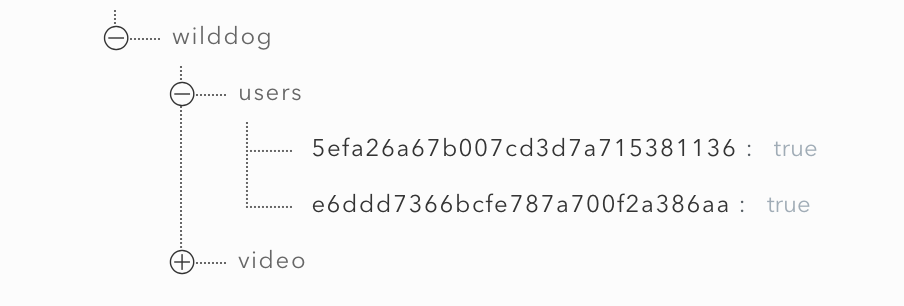
Section titled “4. 实现用户列表”邀请对方加入视频通话,需要获取对方的在线状态。Video SDK 本身不提供获取在线用户列表功能,因此需要开发者使用 Sync SDK 来自己实现。用户登陆系统后将自己的 Wilddog ID 保存到用户列表中。
// 将自己加入到用户列表中WDGSyncReference *userWilddog = [[self.syncReference child:@"users"] child:self.user.uid];[userWilddog setValue:@YES];[userWilddog onDisconnectRemoveValue];数据库中的数据结构如图所示:
5. 获取和预览本地视频
Section titled “5. 获取和预览本地视频”通过 Video SDK 获取本地视频流,并在视频展示控件中预览。
- (void)createLocalStream{    // 创建本地流    WDGVideoLocalStreamOptions *localStreamOptions = [[WDGVideoLocalStreamOptions alloc] init];    localStreamOptions.audioOn = YES;    localStreamOptions.videoOption = WDGVideoConstraintsHigh;    self.localStream = [[WDGVideoLocalStream alloc] initWithOptions:localStreamOptions];}
- (void)previewLocalStream{    // 将本地流展示到 `localVideoView` 中    if (self.localStream != nil) {        [self.localStream attach:self.localVideoView];    }}
6. 发起视频通话
Section titled “6. 发起视频通话”选择用户列表中的用户,发起视频通话。
WDGVideoConnectOptions *connectOptions = [[WDGVideoConnectOptions alloc] initWithLocalStream:self.localStream];WDGVideoOutgoingInvite *outgoingInvitation = [self.wilddogVideoClient inviteToConversationWithID:userID options:connectOptions completion:^(WDGVideoConversation *conversation, NSError *error) {    __strong __typeof__(self) strongSelf = weakSelf;    if (strongSelf == nil) {        return;    }
    if (conversation != nil) {        // 邀请成功        strongSelf.videoConversation = conversation;        strongSelf.videoConversation.delegate = strongSelf;    } else {        // 邀请失败        NSString *errorMessage = [NSString stringWithFormat:@"邀请参与者错误(%@): %@", participantID, [error localizedDescription]];        NSLog(@"%@",errorMessage);
        [strongSelf showAlertWithTitle:@"提示" message:errorMessage];    }}];
7. 接受或拒绝邀请
Section titled “7. 接受或拒绝邀请”发起视频通话后,被邀请人会收到邀请事件,被邀请人可以选择接受或拒绝该邀请,接受邀请则视频通话建立。
// 展示弹窗让用户选择是否接受邀请UIAlertController *alertController = [UIAlertController alertControllerWithTitle:nil message:[NSString stringWithFormat:@"%@ 邀请你进行视频通话", invite.fromUserID] preferredStyle:UIAlertControllerStyleAlert];UIAlertAction *rejectAction = [UIAlertAction actionWithTitle:@"拒绝" style:UIAlertActionStyleDefault handler:^(UIAlertAction *action) {    [invite reject];}];
__weak __typeof__(self) weakSelf = self;UIAlertAction *acceptAction = [UIAlertAction actionWithTitle:@"接受" style:UIAlertActionStyleDefault handler:^(UIAlertAction *action) {    [invite acceptWithLocalStream:self.localStream completion:^(WDGVideoConversation *conversation, NSError *error) {        __strong __typeof__(self) strongSelf = weakSelf;        if (strongSelf == nil) {            return;        }        if (error) {            NSLog(@"error: %@", [error localizedDescription]);            return ;        }
        strongSelf.videoConversation = conversation;        strongSelf.videoConversation.delegate = strongSelf;    }];}];
[alertController addAction:rejectAction];[alertController addAction:acceptAction];[self presentViewController:alertController animated:YES completion:nil];
8. 展示对方视频
Section titled “8. 展示对方视频”视频通话建立成功后,在视频通话中能够获取到对方视频流,在视频展示控件中展示。
- (void)conversation:(WDGVideoConversation *)conversation didConnectParticipant:(WDGVideoParticipant *)participant{    // 将participant 的代理设置为自己,以便在获得音视频流时得到通知    participant.delegate = self;}
- (void)participant:(WDGVideoParticipant *)participant didAddStream:(WDGVideoRemoteStream *)stream{    // 获得参与者音视频流,将其展示出来    NSLog(@"receive stream %@ from participant %@", stream, participant);    self.remoteStream = stream;    [self.remoteStream attach:self.remoteVideoView];}
9. 离开视频通话
Section titled “9. 离开视频通话”视频通话过程中,调用下面方法离开视频通话。
// 断开视频通话[self.videoConversation disconnect];
// 清理资源[self.remoteStream detach:self.remoteVideoView];self.remoteStream = nil;self.videoConversation = nil;
获取示例源码
Section titled “获取示例源码”点此获取完整的 示例源码