用户管理
本篇文档介绍如何使用 Wilddog Auth 管理用户。它包括:创建用户、获取用户信息、获取用户属性、更新用户信息、删除用户等。
创建用户包含以下四种方法:
获取用户信息
Section titled “获取用户信息”用户信息包含 用户属性 及用户的登录信息。
获取当前登录用户
Section titled “获取当前登录用户”获取当前登录用户是管理用户的基础。
获取当前登录用户包含以下两种方法:
- 在
Auth实例上设置监听器 - 使用
currentUser方法
使用监听器:
wilddog.auth().onAuthStateChanged(function(user) { if (user) { console.log("user"); } else { console.log("no user"); }});使用 currentUser 方法:
var user = wilddog.auth().currentUser;if (user != null) { // 用户已登录} else { // 没有用户登录}注意:
推荐使用监听器,这样可以保证在你获取当前用户时 Auth 实例不会处于中间状态,如用户正在登录时。
获取用户属性
Section titled “获取用户属性”User 实例可以用于获取用户属性。
var user = wilddog.auth().currentUser;if (user != null) { var name = user.displayName; var email = user.email; var phone = user.phone var photoUrl = user.photoURL; var uid = user.uid;} else { // 没有用户登录}获取 Provider 的用户属性
Section titled “获取 Provider 的用户属性”providerData 用于获取所有 Provider 的用户属性。
var user = wilddog.auth().currentUser;console.log(user);user.providerData.forEach(function (profile) { console.log("Sign-in provider: " + profile.providerId); console.log(" Provider-specific UID: " + profile.uid); console.log(" Name: " + profile.displayName); console.log(" Email: " + profile.email); console.log(" Phone: " + profile.phone); console.log(" Photo URL: " + profile.photoURL);});更新用户信息
Section titled “更新用户信息”User 实例用于更新 用户属性 及用户的登录信息。
更新用户属性
Section titled “更新用户属性”updateProfile() 方法用于更新用户属性。
例如,更新用户的displayName 和 photoURL 属性:
wilddog.auth().currentUser.updateProfile({ displayName: "name", photoURL: "https://example.com/path/photo.jpg" }).then(function() { // 更新成功 }).catch(function(error) { // 发生错误 });注意:
使用 customToken 登录时,若该登录用户为 admin 用户,则不能更新用户属性。
updatePhone() 方法用于更新用户手机号。
wilddog.auth().currentUser.updatePhone("18888888888").then(function() { // 更新成功}).catch(function(error) { // 发生错误 console.log(error);});注意:
- 要更新用户的手机号,该用户必须最近登录过。请参考 [重新进行身份认证](/auth/Web/guide/manageuser.html#重新进行身份认证)。
- 使用 customToken 登录时,若该登录用户为 admin 用户,则不能更新手机号。
更新邮箱地址
Section titled “更新邮箱地址”updateEmail() 方法用于更新用户邮箱地址。
wilddog.auth().currentUser.updateEmail("12345678@wilddog.com").then(function() { // 更新成功}).catch(function(error) { // 发生错误 console.log(error);});注意:
- 要更新用户的邮箱地址,该用户必须最近登录过。请参考 [重新进行身份认证](/auth/Web/guide/manageuser.html#重新进行身份认证)。
- 使用 customToken 登录时,若该登录用户为 admin 用户,则不能更新邮箱地址。
更新用户密码
Section titled “更新用户密码”updatePassword() 方法用于更新用户密码。
wilddog.auth().currentUser.updatePassword("password123").then(function() { // 更新成功}).catch(function(error) { console.log(error); // 发生错误});注意:
- 要更新密码,该用户必须最近登录过。请参考 [重新进行身份认证](/auth/Web/guide/manageuser.html#重新进行身份认证)。
- 使用 customToken 登录时,若该登录用户为 admin 用户,则不能更新用户密码。
发送重设密码短信
Section titled “发送重设密码短信”sendPasswordResetSms() 方法用于向用户发送重设密码短信。
wilddog.auth().sendPasswordResetSms("13888888888").then(function() { // 发送成功}).catch(function(error) { // 发生错误 console.log(error);});注意:
在控制面板 身份认证—登录方式—邮箱登录 中可以设置邮件自定义模板。
发送重设密码邮件
Section titled “发送重设密码邮件”sendPasswordResetEmail() 方法用于向用户发送重设密码邮件。
wilddog.auth().sendPasswordResetEmail("12345678@wilddog.com").then(function() { // 发送成功}).catch(function(error) { // 发生错误 console.log(error);});注意:
在控制面板 身份认证—登录方式—邮箱登录 中可以设置邮件自定义模板。
删除用户的方式有以下两种:
- 通过
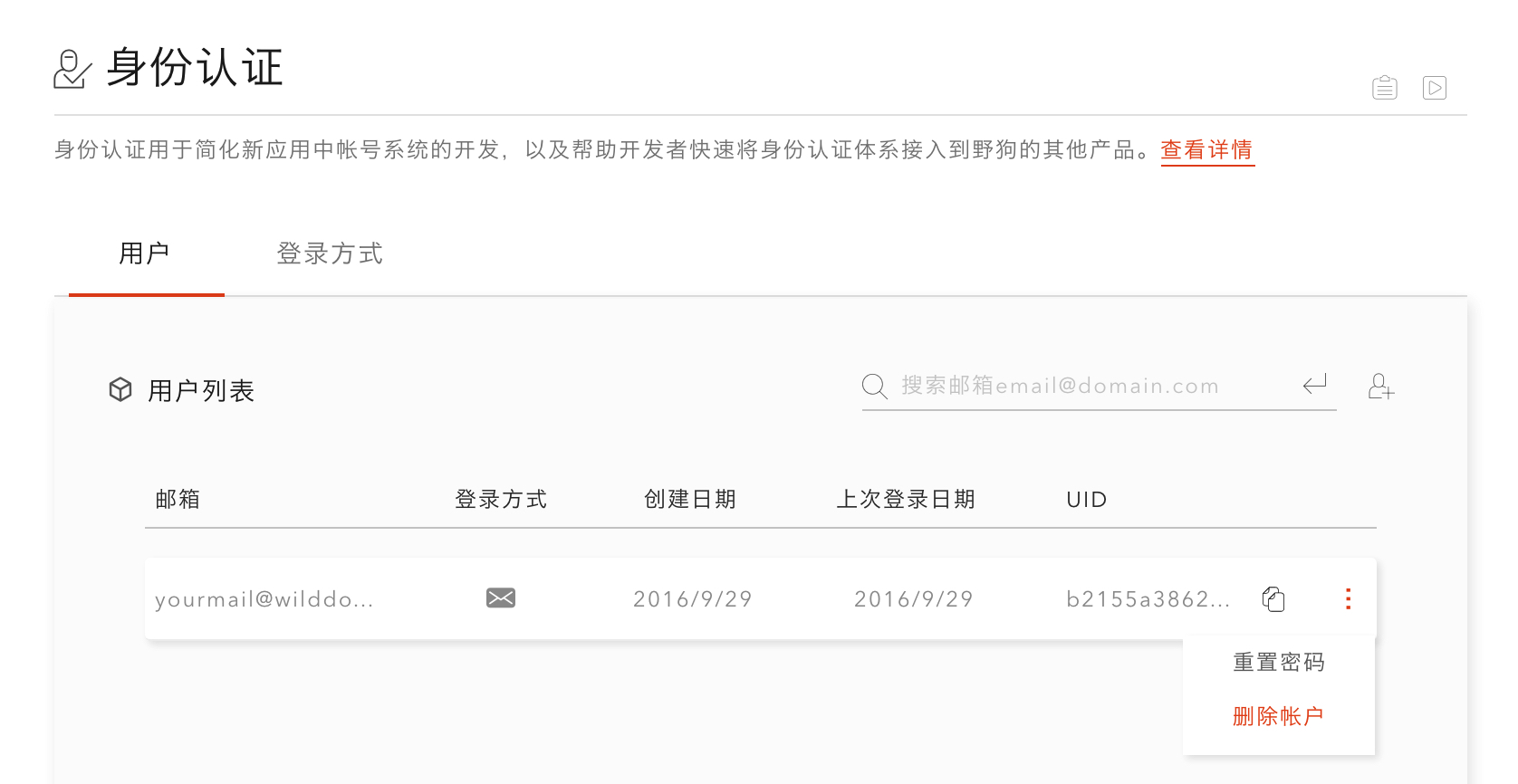
delete()方法删除 - 在控制面板身份认证—用户 中手动删除
使用 delete() 方法:
wilddog.auth().currentUser.delete().then(function() { // 删除成功}).catch(function(error) { // 发生错误 console.log(error);});使用控制面板:
注意:
- 要删除用户,该用户必须最近登录过。请参考 [重新进行身份认证](/auth/Web/guide/manageuser.html#重新进行身份认证)。
- 使用 customToken 登录时,若该登录用户为 admin 用户,则不能更新用户密码。
重新进行身份认证
Section titled “重新进行身份认证”用户长时间未登录的情况下进行下列安全敏感操作会失败:
- 删除帐户
- 设置主邮箱地址
- 更改密码
此时需要重新对用户进行身份认证。
reauthenticate(credential) 方法用于对用户重新进行身份认证。
var credential ; // 需要初始化 wilddog.auth().currentUser.reauthenticate(credential).then(function(res) { // 重新认证成功 console.log(res); }).catch(function(error) { // 发生错误 console.log(error); });